Evidence-led buyer's guide · Updated 22 August 2026

Best Zendesk alternatives for small SaaS teams

“Mailbox” can mean a personal email app, a shared team inbox, or a support queue. The right replacement depends on which job your SaaS actually needs done.

I · Buyer fit

Start with the operating model.

Choose a support platform

Several people answer customers.

Pick Zendesk when messages need ticket owners and escalation. Pick Zoho TeamInbox when the work is collaborative but should still feel like email. Pick Outlook when Microsoft 365 is already deployed and a shared mailbox is enough.

Choose Folio

One founder answers for several domains.

Folio fits a solo SaaS operator who receives mail for a product, consultancy, and holding company but wants one reading surface. It automatically preserves the domain identity on reply. It is the wrong choice for teams.

II · Feature comparison

Six different answers to “one inbox.”

Zendesk and five alternatives, compared by buyer fit and implementation.
ProductBest forCollaboration modelIntegrationsImplementationDecision
ZendeskBaseline: SaaS support queuesTickets, assignment, status, agent workflowSupport and customer-service ecosystemConnect support addresses and route messages into ticketsChoose when ownership, escalation, and reporting matter more than a traditional mailbox.
Zoho TeamInboxCollaborative email without a full help deskAssignment, comments, co-authoring, activity logZoho and multichannel communication toolsConnect an existing group address, then define views and workflowsChoose when a team needs to work together inside an inbox-shaped product.
Microsoft OutlookMicrosoft 365 organizationsShared mailbox and calendar membershipMicrosoft 365, Teams, calendar, add-insAn admin creates the mailbox and adds membersChoose when Microsoft 365 is already the operating system for the company.
GmailSmall teams already on Google WorkspaceDelegation and Google Groups, with fewer queue controlsGoogle Workspace and a broad add-on marketConfigure delegation, groups, or a third-party shared-inbox layerChoose for familiarity; add a help-desk layer when assignment and SLAs become necessary.
FastmailIndividuals and businesses wanting polished hosted emailUsers and shared addresses, not a support-ticket queueStandard mail, calendar, contacts, and API accessMove mail and DNS, then configure users and addressesChoose for mailbox quality, privacy, and standards rather than support operations.
FolioOne SaaS founder running several domainsNone: single operator by designCustom-domain mail, calendar invites, IMAP migrationAdd each domain, publish MX/SPF/DKIM/DMARC, then import mailChoose only when one person needs many domain identities in one inbox, not when a team shares support.

Methodology. We compared the workflow each vendor documents publicly: who can access a conversation, whether work can be assigned, what the sending identity looks like, and what must be configured to go live. We did not score unpublished performance, claim a universal winner, or treat marketing copy as a measured outcome.

III · Proof and product boundary

Visible evidence, including what Folio cannot do.

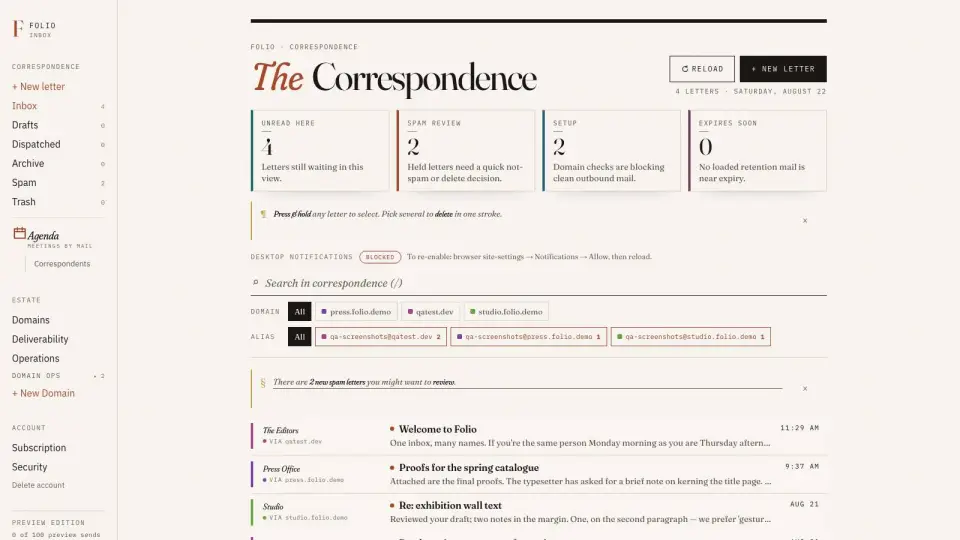
Folio inbox showing messages from several color-coded business domains
Folio's production inbox groups one operator's domain identities in one reading view. This is not a shared support queue.

What the screenshot and manual prove

Every inbound message keeps the address and domain it arrived on. A reply defaults to that identity, so a letter to support@product.example goes back from the same address. The identity documentation describes that behavior and the screenshot shows the multi-domain reading surface.

There is deliberately no customer quote here: Folio has not collected a permissioned testimonial for this use case. The evidence is product documentation, a real interface capture, and the explicit capability boundary instead.

IV · Implementation notes

A shortlist should include the migration.

  1. Define ownership. Decide whether one person or a team answers each address.
  2. Map the workflow. List assignment, internal notes, escalation, reporting, and integrations that are actually required.
  3. Run in parallel. Connect or import historical mail before changing MX records; keep the old service available during verification.
  4. Authenticate every sending domain. Publish SPF, DKIM, and DMARC, then test replies from each public address.
  5. Verify the customer path. Send a real support request, assign or reply to it, and confirm the recipient sees the expected From identity.

For Folio's single-operator path, review the product features, who the product is built for, and implementation resources before starting a trial.

V · FAQ

Zendesk alternatives for SaaS: quick answers

What are the best Zendesk alternatives for a small SaaS team?

Shortlist Zoho TeamInbox when the team wants collaborative email rather than a full help desk, and Outlook when a Microsoft 365 shared mailbox is sufficient. Gmail and Fastmail need additional workflow for assignment and escalation. A solo SaaS founder managing several domains can consider Folio, but Folio is not a shared inbox.

Is Folio a Zendesk alternative?

Not for a support team. Zendesk provides agent workflows, assignment, ticket status, escalation, and reporting. Folio is a single-operator email host that keeps several domain identities in one personal inbox.

Should a SaaS company use a shared mailbox or a help desk?

Use a shared mailbox when a small team mainly needs shared visibility and replies. Use a help desk when requests need owners, statuses, escalation rules, service targets, or support reporting.

Can one SaaS founder manage several brands without a team inbox?

Yes. If one person handles every message, a multi-domain inbox can preserve a separate From address and DKIM identity for each brand without adding team workflow the operator does not need.

Sources checked 22 August 2026